Dazu benötigen wir das Paket LIRC und müssen die Dateien hardware.conf und lircd.conf für die jeweilige Fernbedienung erstellen. Im Gegenzug brauchen wir für XBMC eine angepasste Lircmap.xml und Keyboard.xml (ab Version 9.11) für die Fernbedienung.
Daher möchte ich euch eine HowTo für die PC-Funkfernbedienung X10 nicht vorenthalten.
HINWEIS: Leider ist das alte X10 Modell (Pollin) nicht mehr verfügbar, das neue X10 Modell (Amazon) sollte aber, laut einiger Forenbeiträge, genauso funktionieren.
Voraussetzung:
- Ubuntu Karmic 9.10
- NVIDIA Treiber 195 mit VDPAU Unterstützung (HowTo)
- DVB-S2 – Treiber s2-liplianin installieren (HowTo)
- VDR 1.7.12 + ExtensionPatch mit Streamdev Plugin (HowTo)
- XBMC + VDR Plugin mit VDPAU Unterstützung (HowTo)
HowTo: LIRC – XBMC mit PC-Funkfernbedienung X10 steuern
Zuerst editieren wir die blacklist.conf und fügen das Modul ati_remote ein damit unser USB-IR Empfänger nicht falsch erkannt wird.
sudo vi /etc/modprobe.d/blacklist.conf
blacklist ati_remote
Nun schließen wir den IR-Empfänger am Computer an, installieren LIRC…
sudo aptitude install lirc
…und laden die Module.
modprobe lirc_dev
modprobe lirc_atiusb
Jetzt prüfen wir ob der IR-Empfänger als Device lirc0 erkannt wurde, …
ls /dev/lirc*
…wenn ja, geht es mit dem Editieren der hardware.conf und lircd.conf (bereitgestellt von Phr0zenPhara0 aus dem VDR Portal) weiter. (Download am Ende des Artikels)
gksu gedit /etc/lirc/hardware.conf
#
#Chosen Remote Control
REMOTE="None"
REMOTE_MODULES="lirc_atiusb"
REMOTE_DRIVER=""
REMOTE_DEVICE="/dev/lirc0"
REMOTE_SOCKET=""
REMOTE_LIRCD_CONF=""
REMOTE_LIRCD_ARGS=""

#Chosen IR Transmitter
TRANSMITTER="None"
TRANSMITTER_MODULES=""
TRANSMITTER_DRIVER=""
TRANSMITTER_DEVICE=""
TRANSMITTER_SOCKET=""
TRANSMITTER_LIRCD_CONF=""
TRANSMITTER_LIRCD_ARGS=""

#Enable lircd
START_LIRCD="true"

#Don't start lircmd even if there seems to be a good config file
#START_LIRCMD="false"

#Try to load appropriate kernel modules
LOAD_MODULES="true"

# Default configuration files for your hardware if any
LIRCMD_CONF=""

#Forcing noninteractive reconfiguration
#If lirc is to be reconfigured by an external application
#that doesn't have a debconf frontend available, the noninteractive
#frontend can be invoked and set to parse REMOTE and TRANSMITTER
#It will then populate all other variables without any user input
#If you would like to configure lirc via standard methods, be sure
#to leave this set to "false"
FORCE_NONINTERACTIVE_RECONFIGURATION="false"
START_LIRCMD=""
gksu gedit /etc/lirc/lircd.conf
# Please make this file available to others
# by sending it to <lirc@bartelmus.de>
#
# this config file was automatically generated
# using lirc-0.8.6
#
# contributed by
#
# brand: PC-Funkfernbedienung X10
# model no. of remote control:
# devices being controlled by this remote:

begin remote

  name  x10
  bits           16
  eps            30
  aeps          100

  one             0     0
  zero            0     0
  pre_data_bits   8
  pre_data       0x14
  post_data_bits  16
  post_data      0x0
  gap          139990
  min_repeat      2
  toggle_bit_mask 0x80800000

      begin codes
          livetv                   0xF11C
          rectv                    0x6D98
          photo                    0xDA05
          music                    0x5B86
          dvdmenu                  0xD904
          video                    0x82AD
          audio                    0x0732
          angle                    0x89B4
          title                    0x0A35
          subtitle                 0x88B3
          up                       0xEF1A
          down                     0x77A2
          left                     0xF21D
          right                    0x749F
          ok                       0xF31E
          1                        0x628D
          2                        0xE30E
          3                        0x648F
          4                        0xE510
          5                        0x6691
          6                        0xE712
          7                        0x6893
          8                        0xE914
          9                        0x6A95
          0                        0xEC17
          asterisk                 0x8CB7
          hash                     0x0D38
          world                    0x709B
          rewind                   0xF924
          play                     0x7AA5
          forward                  0xFB26
          pause                    0x7EA9
          previous                 0xF621
          next                     0x78A3
          stop                     0xFD28
          record                   0x7CA7
          off                      0xD702
          guide                    0x86B1
          text                     0xEB16
          volume+                  0x5E89
          volume-                  0xDD08
          mute                     0x5580
          program+                 0xE00B
          program-                 0x618C
          back                     0xF520
          info                     0x84AF
      end codes

end remote
Nun erstellen wir die angepasste Lircmap.xml und Keyboard.xml (beide Dateien wurden von Phr0zenPhara0 aus dem VDR Portal bereitgestellt) für unser XBMC. (Download am Ende des Artikels)
gedit ~/.xbmc/userdata/Lircmap.xml
<lircmap>
<remote device="x10">
 <obc1>livetv</obc1>
 <obc2>rectv</obc2>
 <obc3>photo</obc3>
 <obc4>music</obc4>
 <obc5>dvdmenu</obc5>
 <obc6>video</obc6>
 <obc7>audio</obc7>
 <obc8>angle</obc8>
 <obc9>title</obc9>
 <obc10>subtitle</obc10>
 <obc11>up</obc11>
 <obc12>down</obc12>
 <obc13>left</obc13>
 <obc14>right</obc14>
 <obc15>ok</obc15>
 <obc16>1</obc16>
 <obc17>2</obc17>
 <obc18>3</obc18>
 <obc19>4</obc19>
 <obc20>5</obc20>
 <obc21>6</obc21>
 <obc22>7</obc22>
 <obc23>8</obc23>
 <obc24>9</obc24>
 <obc25>0</obc25>
 <obc26>asterisk</obc26>
 <obc27>hash</obc27>
 <obc28>world</obc28>
 <obc29>rewind</obc29>
 <obc30>play</obc30>
 <obc31>forward</obc31>
 <obc32>pause</obc32>
 <obc33>previous</obc33>
 <obc34>next</obc34>
 <obc35>stop</obc35>
 <obc36>record</obc36>
 <obc37>off</obc37>
 <obc38>guide</obc38>
 <obc39>text</obc39>
 <obc40>volume+</obc40>
 <obc41>volume-</obc41>
 <obc42>mute</obc42>
 <obc43>program+</obc43>
 <obc44>program-</obc44>
 <obc45>back</obc45>
 <obc46>info</obc46>
</remote>
</lircmap>
gedit ~/.xbmc/userdata/keymaps/Keyboard.xml
<!-- This file contains the mapping of keys (gamepad, remote, and keyboard) to actions within XBMC -->
<!-- The <global> section is a fall through - they will only be used if the button is not          -->
<!-- used in the current window's section.  Note that there is only handling                       -->
<!-- for a single action per button at this stage.                                                 -->
<!-- For joystick/gamepad configuration under linux/win32, see below as it differs from xbox       -->
<!-- gamepads.                                                                                     -->

<!-- The format is:                      -->
<!--    <device>                         -->
<!--      <button>action</button>        -->
<!--    </device>                        -->

<!-- To map keys from other remotes using the RCA protocol, you may add <universalremote> blocks -->
<!-- In this case, the tags used are <obc#> where # is the original button code (OBC) of the key -->
<!-- You set it up by adding a <universalremote> block to the window or <global> section:       -->
<!--    <universalremote>             -->
<!--       <obc45>Stop</obc45>         -->
<!--    </universalremote>            -->
<!-- To find out the OBC's of your remote, try enabling the <displayremotecodes> tag in AdvancedSettings.xml -->

<!-- Note that the action can be a built-in function.                 -->
<!--  eg <B>XBMC.ActivateWindow(MyMusic)</B>                         -->
<!-- would automatically go to My Music on the press of the B button. -->

<!-- Joysticks / Gamepads:                                                                    -->
<!--   See the sample PS3 controller configuration below for the format.                      -->
<!--                                                                                          -->
<!--  Joystick Name:                                                                          -->
<!--   Do 'cat /proc/bus/input/devices' or see your xbmc log file  to find the names of       -->
<!--   detected joysticks. The name used in the configuration should match the detected name. -->
<!--                                                                                          -->
<!--  Button Ids:                                                                             -->
<!--   'id' is the button ID used by SDL. Joystick button ids of connected joysticks appear   -->
<!--   in xbmc.log when they are pressed. Use your log to map custom buttons to actions.      -->
<!--                                                                                          -->
<!--  Axis Ids / Analog Controls                                                              -->
<!--   Coming soon.                                                                           -->
<keymap>
 <global>
 <universalremote>
 <obc25>number0</obc25>
 <obc16>number1</obc16>
 <obc17>number2</obc17>
 <obc18>number3</obc18>
 <obc19>number4</obc19>
 <obc20>number5</obc20>
 <obc21>number6</obc21>
 <obc22>number7</obc22>
 <obc23>number8</obc23>
 <obc24>number9</obc24>
 <obc30>Play</obc30>
 <obc32>Pause</obc32>
 <obc35>Stop</obc35>
 <obc31>FastForward</obc31>
 <obc29>Rewind</obc29>
 <obc13>Left</obc13>
 <obc14>Right</obc14>
 <obc11>Up</obc11>
 <obc12>Down</obc12>
 <obc15>Select</obc15>
 <obc43>PageUp</obc43>
 <obc44>PageDown</obc44>
 <obc45>ParentDir</obc45>
 <obc5>PreviousMenu</obc5>
 <obc9>ContextMenu</obc9>
 <obc46>Info</obc46>
 <obc34>SkipNext</obc34>
 <obc33>SkipPrevious</obc33>
 <obc28>FullScreen</obc28>
 <obc8>AspectRatio</obc8>
 <obc36>Screenshot</obc36>
 <obc40>VolumeUp</obc40>
 <obc41>VolumeDown</obc41>
 <obc42>Mute</obc42>
 <obc37>ActivateWindow(shutdownmenu)</obc37>
 <obc6>XBMC.ActivateWindow(MyVideos)</obc6>
 <obc4>XBMC.ActivateWindow(MyMusic)</obc4>
 <obc3>XBMC.ActivateWindow(MyPictures)</obc3>
 <obc1>XBMC.ActivateWindow(MyTV)</obc1>
 <obc2>XBMC.ActivateWindow(MyTV)</obc2>
 </universalremote>
 </global>
 <Home>
 <universalremote>
 <obc5>XBMC.Skin.ToggleSetting(HomeViewToggle)</obc5>
 <obc46>XBMC.ActivateWindow(SystemInfo)</obc46>
 <obc26>XBMC.ActivateWindow(Weather)</obc26>
 <obc27>XBMC.ActivateWindow(Settings)</obc27>
 </universalremote>
 </Home>
 <MyFiles>
 <universalremote>
 <obc25>Delete</obc25>
 <obc16>Highlight</obc16>
 <obc19>Copy</obc19>
 <obc22>Move</obc22>
 <obc20>Delete</obc20>
 <obc18>VolumeUp</obc18>
 <obc21>VolumeDown</obc21>
 <obc24>Mute</obc24>
 </universalremote>
 </MyFiles>
 <MyMusicPlaylist>
 <universalremote>
 <obc45>Playlist</obc45>      <!-- Close playlist -->
 <obc25>Delete</obc25>
 <obc17>MoveItemUp</obc17>
 <obc20>MoveItemDown</obc20>
 <obc18>VolumeUp</obc18>
 <obc21>VolumeDown</obc21>
 <obc24>Mute</obc24>
 </universalremote>
 </MyMusicPlaylist>
 <MyMusicPlaylistEditor>
 <universalremote>
 <obc25>Queue</obc25>
 </universalremote>
 </MyMusicPlaylistEditor>
 <MyMusicFiles>
 <universalremote>
 <obc25>Queue</obc25>
 <obc26>Queue</obc26>
 <obc18>VolumeUp</obc18>
 <obc21>VolumeDown</obc21>
 <obc24>Mute</obc24>
 </universalremote>
 </MyMusicFiles>
 <MyMusicLibrary>
 <universalremote>
 <obc25>Queue</obc25>
 <obc26>Queue</obc26>
 <obc18>VolumeUp</obc18>
 <obc21>VolumeDown</obc21>
 <obc24>Mute</obc24>
 </universalremote>
 </MyMusicLibrary>
 <FullscreenVideo>
 <universalremote>
 <obc13>StepBack</obc13>
 <obc14>StepForward</obc14>
 <obc11>BigStepForward</obc11>
 <obc12>BigStepBack</obc12>
 <obc5>OSD</obc5>
 <obc9>CodecInfo</obc9>
 <obc8>AspectRatio</obc8>
 <obc10>ShowSubtitles</obc10>
 <obc7>AudioNextLanguage</obc7>
 <obc46>Info</obc46>
 <obc15>Playlist</obc15>
 <obc38>XBMC.ActivateWindow(TVOSDGuide)</obc38>
 <obc39>XBMC.ActivateWindow(Teletext)</obc39>
 </universalremote>
 </FullscreenVideo>
 <FullscreenInfo>
 <universalremote>
 <obc9>CodecInfo</obc9>
 <obc38>XBMC.ActivateWindow(TVOSDGuide)</obc38>
 <obc39>XBMC.ActivateWindow(Teletext)</obc39>
 <obc45>Close</obc45>
 <obc46>Close</obc46>
 <obc5>OSD</obc5>
 </universalremote>
 </FullscreenInfo>
 <PlayerControls>
 <universalremote>
 <obc15>Close</obc15>
 </universalremote>
 </PlayerControls>
 <Visualisation>
 <universalremote>
 <obc13>PreviousPreset</obc13>
 <obc14>NextPreset</obc14>
 <obc11>IncreaseRating</obc11>
 <obc12>DecreaseRating</obc12>
 <obc45>LockPreset</obc45>
 <obc9>CodecInfo</obc9>
 <obc15>XBMC.ActivateWindow(VisualisationPresetList)</obc15>
 <obc5>XBMC.ActivateWindow(MusicOSD)</obc5>
 <obc46>Info</obc46>
 </universalremote>
 </Visualisation>
 <MusicOSD>
 <universalremote>
 <obc5>Close</obc5>
 <obc45>Close</obc45>
 <obc46>Info</obc46>
 </universalremote>
 </MusicOSD>
 <VisualisationSettings>
 <universalremote>
 <obc5>Close</obc5>
 <obc45>Close</obc45>
 </universalremote>
 </VisualisationSettings>
 <VisualisationPresetList>
 <universalremote>
 <obc5>Close</obc5>
 <obc45>Close</obc45>
 </universalremote>
 </VisualisationPresetList>
 <SlideShow>
 <universalremote>
 <obc25>ZoomNormal</obc25>
 <obc16>ZoomLevel1</obc16>
 <obc17>ZoomLevel2</obc17>
 <obc18>ZoomLevel3</obc18>
 <obc19>ZoomLevel4</obc19>
 <obc20>ZoomLevel5</obc20>
 <obc21>ZoomLevel6</obc21>
 <obc22>ZoomLevel7</obc22>
 <obc23>ZoomLevel8</obc23>
 <obc24>ZoomLevel9</obc24>
 <obc46>CodecInfo</obc46>
 <obc34>NextPicture</obc34>
 <obc33>PreviousPicture</obc33>
 <obc9>Info</obc9>
 <obc15>Rotate</obc15>
 <obc45>PreviousMenu</obc45>
 </universalremote>
 </SlideShow>
 <ScreenCalibration>
 <universalremote>
 <obc15>NextCalibration</obc15>
 <obc25>ResetCalibration</obc25>
 <obc34>NextResolution</obc34>
 </universalremote>
 </ScreenCalibration>
 <GUICalibration>
 <universalremote>
 <obc15>NextCalibration</obc15>
 <obc25>ResetCalibration</obc25>
 </universalremote>
 </GUICalibration>
 <SelectDialog>
 <universalremote>
 <obc45>Close</obc45>
 </universalremote>
 </SelectDialog>
 <VideoOSD>
 <universalremote>
 <obc5>PreviousMenu</obc5>
 <obc45>Close</obc45>
 </universalremote>
 </VideoOSD>
 <VideoMenu>
 <universalremote>
 <obc5>OSD</obc5>
 <obc45>PreviousMenu</obc45>
 <obc46>Info</obc46>
 <obc9>CodecInfo</obc9>
 <obc25>Number0</obc25>
 <obc16>Number1</obc16>
 <obc17>Number2</obc17>
 <obc18>Number3</obc18>
 <obc19>Number4</obc19>
 <obc20>Number5</obc20>
 <obc21>Number6</obc21>
 <obc22>Number7</obc22>
 <obc23>Number8</obc23>
 <obc24>Number9</obc24>
 </universalremote>
 </VideoMenu>
 <OSDVideoSettings>
 <universalremote>
 <obc5>Close</obc5>
 <obc45>Close</obc45>
 </universalremote>
 </OSDVideoSettings>
 <OSDAudioSettings>
 <universalremote>
 <obc5>Close</obc5>
 <obc45>Close</obc45>
 </universalremote>
 </OSDAudioSettings>
 <VideoBookmarks>
 <universalremote>
 <obc45>Close</obc45>
 <obc5>Close</obc5>
 <obc25>Delete</obc25>
 </universalremote>
 </VideoBookmarks>
 <MyVideoLibrary>
 <universalremote>
 <obc26>Queue</obc26>
 <obc25>Delete</obc25>
 <obc18>VolumeUp</obc18>
 <obc21>VolumeDown</obc21>
 <obc24>Mute</obc24>
 </universalremote>
 </MyVideoLibrary>
 <MyVideoFiles>
 <universalremote>
 <obc26>Queue</obc26>
 <obc18>VolumeUp</obc18>
 <obc21>VolumeDown</obc21>
 <obc24>Mute</obc24>
 </universalremote>
 </MyVideoFiles>
 <MyVideoPlaylist>
 <universalremote>
 <obc45>Playlist</obc45>      <!-- Close playlist -->
 <obc25>Delete</obc25>
 <obc17>MoveItemUp</obc17>
 <obc20>MoveItemDown</obc20>
 <obc18>VolumeUp</obc18>
 <obc21>VolumeDown</obc21>
 <obc24>Mute</obc24>
 </universalremote>
 </MyVideoPlaylist>
 <VirtualKeyboard>
 <universalremote>
 <obc45>BackSpace</obc45>
 <obc26>Shift</obc26>
 <obc27>Symbols</obc27>
 <obc25>Number0</obc25>
 <obc16>Number1</obc16>
 <obc17>Number2</obc17>
 <obc18>Number3</obc18>
 <obc19>Number4</obc19>
 <obc20>Number5</obc20>
 <obc21>Number6</obc21>
 <obc22>Number7</obc22>
 <obc23>Number8</obc23>
 <obc24>Number9</obc24>
 <obc44>CursorLeft</obc44>
 <obc43>CursorRight</obc43>
 </universalremote>
 </VirtualKeyboard>
 <ContextMenu>
 <universalremote>
 <obc45>Close</obc45>
 </universalremote>
 </ContextMenu>
 <FileStackingDialog>
 <universalremote>
 <obc45>Close</obc45>
 </universalremote>
 </FileStackingDialog>
 <Scripts>
 <universalremote>
 <obc46>XBMC.ActivateWindow(ScriptsDebugInfo)</obc46>
 </universalremote>
 </Scripts>
 <ScriptsDebugInfo>
 <universalremote>
 <obc46>Info</obc46>      <!-- clears debug python info -->
 </universalremote>
 </ScriptsDebugInfo>
 <NumericInput>
 <universalremote>
 <obc25>Number0</obc25>
 <obc16>Number1</obc16>
 <obc17>Number2</obc17>
 <obc18>Number3</obc18>
 <obc19>Number4</obc19>
 <obc20>Number5</obc20>
 <obc21>Number6</obc21>
 <obc22>Number7</obc22>
 <obc23>Number8</obc23>
 <obc24>Number9</obc24>
 <obc45>BackSpace</obc45>
 </universalremote>
 </NumericInput>
 <Weather>
 <universalremote>
 <obc45>PreviousMenu</obc45>
 </universalremote>
 </Weather>
 <Settings>
 <universalremote>
 <obc45>PreviousMenu</obc45>
 </universalremote>
 </Settings>
 <MyPicturesSettings>
 <universalremote>
 <obc45>PreviousMenu</obc45>
 </universalremote>
 </MyPicturesSettings>
 <MyProgramsSettings>
 <universalremote>
 <obc45>PreviousMenu</obc45>
 </universalremote>
 </MyProgramsSettings>
 <MyWeatherSettings>
 <universalremote>
 <obc45>PreviousMenu</obc45>
 </universalremote>
 </MyWeatherSettings>
 <MyMusicSettings>
 <universalremote>
 <obc45>PreviousMenu</obc45>
 </universalremote>
 </MyMusicSettings>
 <SystemSettings>
 <universalremote>
 <obc45>PreviousMenu</obc45>
 </universalremote>
 </SystemSettings>
 <MyVideosSettings>
 <universalremote>
 <obc45>PreviousMenu</obc45>
 </universalremote>
 </MyVideosSettings>
 <NetworkSettings>
 <universalremote>
 <obc45>PreviousMenu</obc45>
 </universalremote>
 </NetworkSettings>
 <AppearanceSettings>
 <universalremote>
 <obc45>PreviousMenu</obc45>
 </universalremote>
 </AppearanceSettings>
 <Profiles>
 <universalremote>
 <obc45>PreviousMenu</obc45>
 </universalremote>
 </Profiles>
 <systeminfo>
 <universalremote>
 <obc45>PreviousMenu</obc45>
 </universalremote>
 </systeminfo>
 <shutdownmenu>
 <universalremote>
 <obc45>PreviousMenu</obc45>
 </universalremote>
 </shutdownmenu>
 <submenu>
 <universalremote>
 <obc45>PreviousMenu</obc45>
 </universalremote>
 </submenu>
 <MusicInformation>
 <universalremote>
 <obc45>Close</obc45>
 </universalremote>
 </MusicInformation>
 <MovieInformation>
 <universalremote>
 <obc45>Close</obc45>
 </universalremote>
 </MovieInformation>
 <LockSettings>
 <universalremote>
 <obc5>Close</obc5>
 <obc45>PreviousMenu</obc45>
 </universalremote>
 </LockSettings>
 <ProfileSettings>
 <universalremote>
 <obc5>Close</obc5>
 <obc45>PreviousMenu</obc45>
 </universalremote>
 </ProfileSettings>
 <PictureInfo>
 <universalremote>
 <obc34>NextPicture</obc34>
 <obc33>PreviousPicture</obc33>
 <obc46>Close</obc46>
 <obc45>Close</obc45>
 </universalremote>
 </PictureInfo>
 <Favourites>
 <universalremote>
 <obc45>Close</obc45>
 </universalremote>
 </Favourites>
 <EPGProgInfo>
 <universalremote>
 <obc45>Close</obc45>
 <obc5>Close</obc5>
 <obc38>Close</obc38>
 </universalremote>
 </EPGProgInfo>
 <TVOSDChannels>
 <universalremote>
 <obc5>Close</obc5>
 <obc45>Close</obc45>
 </universalremote>
 </TVOSDChannels>
 <TVOSDGuide>
 <universalremote>
 <obc45>Close</obc45>
 <obc5>Close</obc5>
 <obc38>Close</obc38>
 </universalremote>
 </TVOSDGuide>
 <MyTVSettings>
 <universalremote>
 <obc45>PreviousMenu</obc45>
 </universalremote>
 </MyTVSettings>
 <Teletext>
 <universalremote>
 <obc25>number0</obc25>
 <obc16>number1</obc16>
 <obc17>number2</obc17>
 <obc18>number3</obc18>
 <obc19>number4</obc19>
 <obc20>number5</obc20>
 <obc21>number6</obc21>
 <obc22>number7</obc22>
 <obc23>number8</obc23>
 <obc24>number9</obc24>
 <obc7>Red</obc7>
 <obc10>Green</obc10>
 <obc8>Yellow</obc8>
 <obc9>Blue</obc9>
 <obc46>Info</obc46>
 <obc45>Close</obc45>
 <obc5>Close</obc5>
 <obc39>Close</obc39>
 </universalremote>
 </Teletext>
</keymap>
Jetzt starten wir den LIRC Dienst…
sudo /etc/init.d/lirc start
…und danach unser XBMC. Schwupps, können wir das Media-Center über die X10 Funkfernbedienung steuern. SUPER!! 
UPDATE: Hier die X10.conf, für das neue X10 Modell mit dem Scrollrad. – Danke an Bayliner
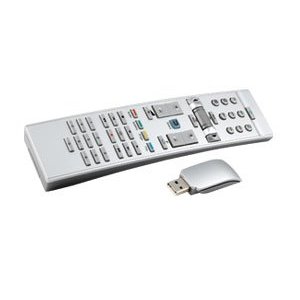
Link: PC-Funkfernbedienung X10
Download: LIRC – PC-Funkfernbedienung X10 – hardware.conf & lircd.conf und XBMC – PC-Funkfernbedienung X10 – Lircmap.xml & Keyboard.xml
Workaround 10.10: Ubuntu 10.10 – LIRC – XBMC mit PC-Funkfernbedienung X10 steuern

Vielen Dank kann ich nur sagen.
Endlich mal ne lirc Anleitung die auf anhieb funktioniert hat.
Die anderen Anleitungen rund um XBMC haben noch nicht so recht gefunzt. VDPAU, VDR-TV,
Aber ich werde weiter probieren.
Wäre toll wenn das ganze nachher so einfach auch unter Ubuntu 10.04 Lucid Lynx geht.
Das wird dann mein letztes Ubuntu. Weitere Dist-Upgrates will ich nicht mehr machen.
Nochmals velen Dank
Gruß Thomas
Works like charm. Directly out of the box.
Thank you very many!
Vielen Dank für diesen Beitrag!
Nach stundenlangem suchen und wikis durchackern (hatte teilweise bis zu 50 Seiten auf…), hat genau dieser Beitrag alle Fragen beantwortet und alle meine Probleme gelöst.
Gruß, Ralf
coole Anleitung und funktionierende configs!
Bei mir haben leider die modprobe lirc_dev und modprobe lirc_atiusb Befehle nicht funktioniert. (Debian Lenny amd64) Die Module mussten vorher zuerst in den Kernel eingebaut werden. Das habe ich dann mit m-a a-i lirc gemacht. Der Tipp kam aus einem Forum.
Ansonsten hat alles innerhalb weniger Minuten funktioniert!
Electronic Handshakes
Cosmix
Hallo,
könntest Du die Fernbedienung dann auch gleich auf
https://www.pascalschmolck.de/wp-login.php?redirect_to=https%3A%2F%2Fwww.pascalschmolck.de%2F&reauth=1
hinzufügen und bewerten? Das wäre super!
Dann wissen auch andere, was für eine Fernbedienung sie sich ohne “böse Überraschungen” zulegen können.
Gruß
Piccolino81
Hi Piccolino81,
du könntest Sie für mich eintragen oder? Dann muss ich mir keinen Account anlegen. 🙂
Hi,
da die Fernbedienung bei Pollin im Moment leider ausverkauft ist, hab ich mich nach einer anderen umgeschaut.
Ebenfalls mit einem X10 Empfänger und die Anzahl/Funktion der Tasten scheinen laut Bild identisch zu sein.
So jetzt meine Frage:
Kann ich hierfür die selben config-files verwenden?? müsste gehen da es ja auch ein X10 Empfänger ist —> Treiber=atiusb
Gruß pH1L
Hi pH1L, der Meinung bin ich auch – sollte problemlos funktionieren!
Gruß
Die Fernbedienung ist heute gekommen, funktioniert super. Danke für die Anleitung.
Gruß
Freut mich! 😉
kleiner Hinweis:
In der Keyboard.xml sollte noch „TVOSDGuide“ durch „PVROSDGuide“ und „TVOSDChannels“ durch „PVROSDChannels“ ersetzt werden.
Damit die „Guide-Taste“ funktioniert und Cancel der Kanalliste mit der „Back-Taste“ erfolgt.
https://www.vdr-portal.de/forum/index.php?thread/90162-usb-fernbedienung-fuer-xmbc-auf-ubuntu-ion/&threadid=90162&threadview=0&hilight=tvosdguide&hilightuser=0&page=2
Gruß pH1L
Oh, vielen Dank pH1L!
Vielen Dank!
Hallo,
beim ersten Mal hat die Anleitung wunderbar geklappt! (Xbmc-Live)
Jetzt, wo ich yavdr 0.2.0 installiert habe, will sie einfach nicht mehr im XBMC funktionieren. oO
Woran könnte das liegen?
Hallo Mike, keine Ahnung – Frage am Besten mal im yaVDR-Forum.
Grüße Nico
Hallo, habe unter yavdr 0.2 ebenfalls versucht die Fernbedienung zum laufen zu bekommen. Aber irgendwie funktioniert es nicht. Ich habe bin die Schritte 1 zu 1 durchgegangen. Danach hat vdr oder xbmc überhaupt nicht reagiert. Erst als ich im Webinterface als LIRC-Fernbedienung ATI/NVidia/X10 RF Remote angegeben habe hat der vdr zumindest reagiert. Jetzt kam aber der Dialog zum Anlernen der Fernbedienung. Wenn ich das mache, funktioniert zwar die Fernbedienung unter vdr aber nicht im xbmc. Wenn ich jetzt die Dateien von hier einspiele geht sie in xbmc aber nicht mehr korrekt in vdr (nur Ziffertasten gehen).
Könnt Ihr mir vielleicht weiterhelfen?
Noch ne Anmerkung:
Der Link zu dem Pollin Shop is zwar noch aktuell, allerdings ist die Fernbedienung dort ausverkauft, der BSS Shop bei ebay verkauft sie noch:
bzw hier ne kleine Übersicht von Shops: http://x10receiver.net/support_faq?web
Leider funktioniert diese Anleitung nicht mehr unter Ubuntu 10.10 „Maverick Meerkat“, denn „modprobe lirc_atiusb“ liefert nur noch die Fehlermeldung, dass das Modul nicht gefunden wurde. Sehr Schade!
Toll wäre also ein Update dieses sehr hilfreichen Artikels, wie es auch mit dem neuen Ubuntu klappt.
Hi Christopher,
das scheint ein Bug unter Ubuntu 10.10 “Maverick Meerkat” zu sein. (FATAL: Module lirc_atiusb not found)
Link: https://bugs.launchpad.net/ubuntu/+source/linux/+bug/660601
gibt es dazu schon eine Lösung, oder schön bei der 10.04 bleiben.
Als workaround für 10.10 habe ich nicht das Modul geladen, sondern den Treiber atilibusb in der hardware.conf angegeben.
REMOTE=“None“
04 REMOTE_MODULES=““
05 REMOTE_DRIVER=“atilibusb“
06 REMOTE_DEVICE=“/dev/lirc0″
07 REMOTE_SOCKET=““
08 REMOTE_LIRCD_CONF=““
09 REMOTE_LIRCD_ARGS=““
Momentan läuft es wirklich gut.
Danke nochmals für die Anleitungen.
Danke für den Tipp!
Hallo, habe nach dieser anleitung die fernsteuerung zum funktionierne bekommen.
Wolte aber mal nach fragen ob man die tasten irgenwie neu belegen kann. s. b. liegt World ist bei mir auf Musik und Back steuert lautstärke.
Wo könnte man das machen und wie ?
Gruss von hier aus Dänemark
Gregor
Hi Gregor,
scheinbar hast du die Lircmap.xml und Keyboard.xml nicht richtig angepasst oder vergessen XBMC neu zu starten.
Grüße
Hallo Nico, du hasst recht. Nachdem ich mir eine neue Lircmap.xml und Keyboard.xml aus einem link zum VDR forum geholt habe.
Funktioniert die fernsteuerung tadellos. Wie vorher auch. Habe nämlich einen ugrade von ubuntu 9.04 auf 10.04 gemacht und damit auch die neuere version von xbmc. Dann ging das ganze durcheinander. Aber dank deiner sehr guten anleitung und try-and-error funktioniert das ganze jetz wieder. Juhu.
Einen Weihnachtlichen Gruss hier aus den kalten Dänemark (-10)
Gregor
Wer eine Medion 20016398 hat (2 Button-„Kreise“ oben und unten),
der könnte vielleicht an meiner dafür angepassten remote.xml interessiert sein:
Danke OxKing,
nur sieht meine ja ein bisschen anders aus.
Egal ich habs hinbekommen.
Hab in einer Irrecord Datei mal die Codes fürs hoch und runter scrollen herausgefunden und die dann in die X10 neben up/down gesetzt 🙂
Gott 2 Tage am tüfftlen und dann wars doch so simpel
lg Bayliner
Hi Bayliner,
das freut mich. Würdest du die Datei mal irgendwo hochladen?
Dann würde ich meinen Beitrag editieren und deine Datei zum Download anbieten.
Vielen Dank
EDIT: Artikelnummer etc. von der Unterseite der Fernbedienung wären auch gut – Danke.
Moin!
Nach Stundenlangen verzweifeln mit meiner Pollin-X10 läuft Sie nun wunderbar 🙂
Vielen Dank für Dein Maual!
Grüße aus Trier
Hallo Rene, hallo beacon
Rene, Du scheinst Dir vor kurzem bei Pollin die neue Version mit Scrollrad besorgt zu haben, die ich nun auch mein Eigen nenne.
Will das Ding unter LMDE (Linux Mint Debian Edition = Debian Testing „Wheezy“ + Multimedia) zum laufen bringen:
Stick wird sofort erkannt.
kernel: [ 801.875137] usb 7-1: Product: USB Receiver
kernel: [ 801.875139] usb 7-1: Manufacturer: X10 Wireless Technology Inc
modprobe lirc_dev <– ok
modprobe lirc_atiusb <– gibt's da auch nicht (mehr); … Ubuntu basiert auf Debian …
Direkter Eintrag des (verfügbaren) Treibers atilibusb etc. bringt nach Neustart des lircd auch nix:
# /etc/lirc/hardware.conf
#
# Arguments which will be used when launching lircd
LIRCD_ARGS=""
# start lircd
START_LIRCD=true
#Don't start lircmd even if there seems to be a good config file
#START_LIRCMD=false
#Don't start irexec, even if a good config file seems to exist.
#START_IREXEC=false
#Try to load appropriate kernel modules
LOAD_MODULES=true
# Run "lircd –driver=help" for a list of supported drivers.
DRIVER="atilibusb"
# usually /dev/lirc0 is the correct setting for systems using udev
DEVICE="/dev/lirc0"
MODULES=""
# Default configuration files for your hardware if any
LIRCD_CONF="/etc/lircd.conf"
LIRCMD_CONF=""
irw wartet zwar, aber es gibt keine Ausgabe …
Ne Idee ???
LG vom FichdlMaa
Hi FichdlMaa,
wenn ich mich Recht erinnere dann müssen, bei der Nutzung von „atilibusb“ im LIRC, die Module (ati_remote, lirc_atiusbi, lirc_dev) geblacklisted werden.
Testweise kannst du ja mal:
sudo rmmod ati_remotesudo rmmod lirc_atiusbi
sudo rmmod lirc_dev
sudo /etc/init.d/lirc restart
Viel Glück
Nico
PS: Ich weiß nicht ob es unter LMDE auch „init.d“ ist.
Hallo FichdlMaa!
Ich hatte noch von einem alten Projekt, die Fb über. Sprich es ist die alte Fb ohne Scrollrad.
Ich habe YaVDR am laufen und dort funkt Sie super… das ist Ubuntu 10.04.
Bei YaVDR heißt der Befehl, „start remoted“. Da es der selbe Empfänger ist müssten normal die Module auch passen, wie in der Anleitung. Und was bei mir noch wichtig war, ich musste den Kanal ändern!
Wenn ich nicht weiter kam habe ich einfach erst einmal „dpkg-reconfigure lirc“ (Ati_remote xxx Userspace -> None -> fertig) gemacht damit er alles läd und dann mit hilfe dieser Anleitung die Configs überschrieben, das lief supi!
Hast Du denn auch die ZIP runtergeladen hier auf der Seite?
Ich hoffe ich konnte Dir ein wenig weiter helfen.
Grüße aus Trier
Hallo, ich habe jetzt gerade eine Pollin X10 erstanden mir ist aber nicht klar wo ich die x10.conf unterbringen muss?
Kann mir jemand erklären ob ich das unter home stellen muss?
Gruss
malcomx
Hi malcomx!
Das ist die lircd.conf unter /etc/lirc/lircd.conf .
-> cp /etc/lirc/lircd.conf /etc/lirc/lircd.conf.old
-> cp x10.conf /etc/lirc/lircd.conf
Gruss
René
Hi!!
Funzt SUPPER bis auf eine kleinigkeit nach einiger zeit leerlauf reagiert die FB nicht mehr muss den einen neustart machen den geht die wieder wunderbar
geht auch während ich irgendwas gugcke nicht aus nur wen wirklich leerlaufen lasse.
mfg spider
Hi Spider, das hört sich irgendwie sehr nach einer Stromsparfunktion an. Gibt „dmesg“ irgendetwas Interessantes über den IR-Empfänger aus?
Gruß
Hi
hab das Problem, dass im XBMC ein Tastendruck jetzt meist doppelt ausgeführt wird.
Bspw. wenn ich die Cursor-Tasten oder Ok-Taste kurz drücke, springt er im Programm zwei Menüpunkte weiter, als wenn ich entsprechende Taste zwei mal betätige.
Kann ich irgendwo in den o.g. Scripts die Empfindlichkeit regulieren ?
Lg…
Hi Reynolds,
schau dir mal diesen Artikel an, vielleicht löst das schon dein Problem.
https://www.loggn.de/ubuntu-lirc-xbmc-dharma-fernbedienung-tasten-werden-doppelt-erkannt/
Gruß
Hallo. Also out-of-the-box funktionieren bei mir nur die Pfeiltasten und die Lautstärke (diese aber auch genau verkehrt herum)
Habe dann mit dpkg-reconfigure lirc neu eingestellt und die hardware.conf und lirc.con kopiert,
weiß aber noch nicht genau, wohin mit der Keymap. Ich finde das Verzeichnis ~/xbmc nicht im terminal.
mittlerweile funzt die FB nicht mehr, sodass ich mal neu installieren werden.
Hi Crash46,
nachdem du neu installiert hast, LIRC eingerichtet hast und nur die Pfeiltasten funktionieren, mache mal ein:
sudo echo lirc > /sys/class/rc/rc0/protocolsDamit nicht der Kernel die Eingaben der Fernbedienung verarbeitet, sondern LIRC – muss nach jedem Neustart ausgeführt werden, also am Besten in die rc.local schreiben! (ab Kernel 3.x)
Dann musst du natürlich noch die Keymap in dein .xbmc Verzeichnis packen, dieses Verzeichnis wird erst nach dem ersten Start von XBMC erstellt (/home/USERNAME/.xbmc/userdata/).
Viel Glück
Hab was anderes probiert:
Ubuntu 10.04LTS installiert und dann XBMC drüber.
XBMC funktioniert auch wenn ich es als Anwendung starte / bzw. direkt dort anmelde als Sitzung.
Allerdings auch hier, nachdem ich Lirc eingerichtet habe, funktionierte gar nichts mehr mit der FB.
Verzweifle gerade..
Dein tipp funktioniert mit 10.04 nicht, weil der Kernel Versionsnummer kleiner 3.x hat. (aktuell 2.6.32-38)
Hi Crash46, welche LIRC(d)-Version hat Ubuntu 10.04 mittlerweile?
Vermutung, könnte nun auch bei 10.04 so sein:
https://www.loggn.de/ubuntu-10-10-lirc-xbmc-mit-pc-funkfernbedienung-x10-steuern/
Gruß
Hi Leute,
Hat schon mal jemand mal versucht die X10 auf XBMCbuntu unter der XBMC 12 Frodo Beta3 am Laufen zu kriegen (Beta 3 erst ab heute)?
Bin da ein wenig in eine Sackgasse gelafufen, die Kernel Mofule existieren teilweise nicht (Kernel 3.2.0-34-generic-pae), sobald Lirc gestartet oder auch nur eine .conf angepackt wird funktioniert danach nix mehr, irgendwie Chaos.
Und dann habe Ich das Gefühl dass ab Frodo etwas in der Unterstützung der Fernbedienungen geändert wurde? Leider finde lich auf XBMC.org aber keine detailierten Erklärungen zu Frodo.
Gruß, Burn
Hi Burnrubber,
das hört sich, durch den Kernel 3.2, nach einem Problem an, welches ich mit Arch Linux vor 1,5 Jahren hatte. Schaue dir mal diese HowTo an, eventuell könnten auch Teile dieser HowTo interessant sein. Viel Glück!
Gruß Nico
PS: Die Konfigurationsdateien werden bei dir nicht an einem anderen Ort liegen – ich gehe davon aus, dass du in deinen Konfigurationsfiles nur den LIRC_DRIVER umstellen und das alte Modul blacklisten musst.
PS2: Blacklisten unter Ubuntu macht man mit:
Hi Nico,
vielen Dank für deine Hinweise, nur haut das alle noch nicht hin. Sobald Ich die Kernel Module blackliste ist mit Funktion Feierband im XBMC Feierabend und ich bekomme mit irw keinelei Ausgabe von der Fernbedienung.
Wenn Ich LIRC_DRIVER in /etc/lirc/hardware.conf eintrage, wird das nicht interpretiert und es kommt im syslog zu Fehler. trage Ich allerdings folgendes ein, startet Lirc wenigstens wieder:
REMOTE_DEVICE=“/dev/lirc0″
REMOTE_DRIVER=“atilibusb“
Dann kommt es aber beim Aufruf von irw zum Fehler im syslog, dass /dev/lirc0 nicht vorhanden ist. Trage Ich dort /dev/lircd/ ein startet irw vernünftig, aber es kommt zu keinerlei Ausgabe.
Was mich an der ganzen Geschichte wundert ist, dass in der Grundinstallation gar kein LIRC installiert ist. Wo bekommt XBMC den dann die Eingaben her, direkt von /dev/input/event* ?
Im Prinzip wird die Fernbedienung ja OTB richtig installiert und im Kernel auch als X10 Wireless Technology Inc USB Receiver erkannt. Bis auf ein paar Köpfe (u.a. auch Ok ) und das Scrollrad ist ja auch „Grundfunktion“ gegeben, gibt es den nicht noch eine andere Möglichkeit XBMC die fehlenden Köppe anzulernen als den Umweg über Lirc?
Gruß und nochmaligen Dank für die Hilfe,
Burn.
Hi Burn, ich habe leider keine X10 mehr – sonst würde ich es auch mal probieren. Aber poste doch mal deine hardware.conf – am besten bei pastebin.com und schreibe den Link dann hier in die Kommentare. Ich schaue dann mal. 🙂
Gruß
PS: Hier hatte einer das gleiche Problem. 😉 Die Konfigurationsfiles (remote.conf brauchst du nicht) müssten bereits so ausschauen wie in dem Thread, weil so habe ich es hier ja auch erklärt.
Vermutung: Bei der X10 kann man mit einem druck auf den Globus die Frequenz umstellen, es könnte jetzt sein, dass die lircd.conf (Tastendefinition) deswegen nicht mehr richtig ist oder du ein neueres/älteres Model hast – einfach mal testen (irrecord)! Wenn du es hinbekommen hast, wäre ich über eine Info, die lircd.conf und hardware.conf dankbar.
PS2: Wenn du mit irrecord die Tastendefinition (lircd.conf) erzeugst und den Tasten anderen Bezeichnungen, als ich, gibst, dann musst du die Lircmap.xml und/oder Keyboard.xml von XBMC natürlich auch umstellen – auf die neuen Bezeichnungen. 😉
Ziel ist ja aber erstmal, dass irw bzw. irrecord einen Tastendruck erkennt. 🙂
Hi Nico,
meine X10 ist die neue mit dem Scrollrad in der Mitte und der Überschrift „Medion“ 🙂 Da gibt irgendwie keine „Globus“ Taste, dafür in der Mitte eine „Select“ Taste. Habe diese X10 nu aber endlich am Laufen, leider nur mit Abstriche.
Problem lag u.a. am laufenden inputlirc (GRRMMPPFFF…. ÄRGER), an der lircd.conf (deine passte nicht) und einen ganzen Haufen Kernel Module (die Ich, stump-ist-trumpf, alle geblacklistet habe :-)). Habe eine neue lircd.conf angelernt und anschließend die Namen der Tasten manuell an deine angepasst um die Keyboard.xml und Lircmap.xml nutzen zu können, danach kam dann endlich mal Funktion ins Spiel. Welche Taste ist bei Dir „Asterisk“ und Ich hätt da noch ne „Radio“ und die „Screenshoot“ Taste über.
Anschließend hatte Ich das Problem das die Tasten im XBMC erst nach dem 5. druck reagierten, habe die advancedsettings.xml angepasst, nu reagiert XBMC bei jedem 2. druck einer Taste. Ich glaube dafür gibt es auch keine Abhilfe bei dieser Fernbedienung?
Anbei die links zu meiner
hardware.conf
https://pastebin.com/i3fs76Vn
lircd.conf (verweist auf myx10.con)
https://pastebin.com/wj5E43m7
myx10.conf
https://pastebin.com/WUg8QQeg
Wenn Du noch nen heißen Tip wegen der Tastenverzöergung hättest wäre ich dankbar, dann könnte das Ding evtl. noch vor Weinachten ins Wohnzimmer einziehen.
Gruß, Burn.
Hi Burn, das hört sich doch erstmal gut an – freut mich!
Wegen dem doppelten Tastendruck, ich vermute, dass im Hintergrund noch zusätzlich das Modul ati_remote läuft! Kann das sein? Check das mal mit …
lsmod | grep -i ati_remote… ! Wenn ja musst du das Modul
ati_remoteblacklisten. 😉2. Vermutung wäre eine Einstellung in der myx10.conf, und zwar
toggle_bitodertoggle_bit_mask– halte ich aber für unwahrscheinlich.Prüfe erst mal
ati_remote. 🙂Gruß
Hi Nico,
ati_remote läuft defintiv nicht, dafür ist aber rc_core trotz blacklisting wieder vorhanden, wird vermutlich von der TT-connect S2-4600 geladen…
Nachdem ich über gestolpert bin und toggle_bit_mask 0x80800000 in die myx10.conf eingefügt habe, sind die Tastendrücke IO > SOLVED 🙂
Jetzt muss Ich nur noch ein paar Tasten anpassen (Screenshoot und Aufnahme sind irgendwie vertauscht) und versuchen den Scroll etwas schneller zu bekommen, dann bin Ich zufrieden und poste meine entgültigen config nächste Tage nochmal.
Dank und Gruß, Burn.
Hi Nico,
hab noch ne Möglichkeit gefunden die X10 (mit Scrollrad) ohne blacklisten von Modulen einzurichten. Habe den, meiner Meinung nach eleganteren, Weg mal kurz runtergschrieben:
Gruß, Burn.
Ich habe sowohl die X10 Remote 20016398 (War bei einem Medion Rechner dabei, den ich geschenkt bekommen habe) als auch die 40013221 (ist zwar nicht die aktuelle, die es bei Pollin gibt. Zur Not kann ich mir ja die aktuelle ja nochmal kaufen, ich wohn zum Glück nicht weit von Pförring weg). Bei beiden bekomme ich eine Rückmeldung wenn ich irw starte, jedoch mit dem Namen Medion_MD8800.
Keine der beiden Fernbedienungen geht jedoch unter XBMC. Ich benutze Lubuntu 12.04 als Basissystem und XBMC 11.0 Eden
Hat einer eine Idee?
Hi Xande, ich ahne, wo der Fehler ist.
Wenn du
irwstartest und im Terminal die Tasten siehst, steht was hinter der Tastenbeschreibung (Bsp.: KEY_UP devinput oder UP atiremote oder …)?Wie schaut deine Lircmap.xml aus, kannst du die mal bei pastebin.com posten und hier dann den Link?
Gruß Nico
Servus: _nico
Wie ich schon schrieb, steht da hinter den Tastenbeschreibungen Medion_MD8800. Also bei zwei Rechnern. Auf dem Rechner, auf dem ich grad bin, zeigt es x10 an. Ich habe die Lircmap.xml von hier übernommen. Hier der Link zu Pastebin . ich habe die advancedsetting.xml, die hardware.conf, die Lircmap.xml, die Keymap.xml und die Lircd.conf auf verschiedenen Foren und von Seiten übernommen, die alle sich mit dem Problem beschäftigen. Gestern habe ich einen kleinen Rechner aufgesetzt und mit Frodo bespielt. Dort werden beide Fernbedienungen erkannt und zeigen auch „reaktion“ doch geht sowohl bei der älteren 20016398er als auch bei der 400133221er nur die Navigation. Die Back Tasten gehen nicht und auch nicht die OK Taste.
Xande
Hi Xande
1. Problem
Damit nicht der Kernel (daher funktionieren nur die Navigationstasten) die Eingaben der Fernbedienung verarbeitet, sondern LIRC, muss noch ein zusätzlicher Befehl beim Starten ausgeführt werden.
Diesen packst du vielleicht in die rc.local, damit dieser automatisch beim Starten ausgeführt wird.
2. Problem
Bei dem 3. PC zeigt irw „x10“ an, an diesem Rechner wird die Fernbedienung mit dem Befehl (1. Problem) auch funktionieren.
Du musst für die beiden anderen PCs folgenden Eintrag in die Lircmap.xml hinzufügen …
…, weil der Fernbedienungsname nicht „x10“ ist, sondern „Medion_MD8800“!
Also schaut deine Lircmap.xml nun so aus.
Diese Lircmap kannst du aber auch für den 3. PC verwenden, weil „altname“ nur für einen Alternativnamen, neben „x10“, steht.
Gruß Nico
Hi _nico (again)
Danke für deine Antwort. Ich werde das alles gleich mal ausprobieren. Ich hatte nie gedacht, dass es so ein „Kasperltheater“ für mich bedeuten würde, nachdem die erste Fernbedienung von Cyberlink gar keine Probleme gemacht hat. Leider ist diese aber ausverkauft. Hätte ich das Gewusst, hätte ich damals gleich 10 Stück davon gekauft. Der Preis war, mit 1,95 Euro, unschlagbar!
Danke (schon mal im voraus)
Xande
Hallo,
ich brauche Aufgrund Distrubtionswechsel selbst eine neue Fernbedienung. Führen die oben genannten Anweisungen auch für diese Medion x10 zum Erfolg?
https://www.ebay.de/itm/Medion-X10-Remote-mit-USB-Empfanger-fur-HTPC-XBMC-MediaCenter-RaspberryPi-/350706937149?pt=DE_TV_Video_Audio_Fernbedienungen&hash=item51a7c32d3d
Die mit dem Scrollrad sieht mir doch etwas zu billig aus, außerdem leibe ich die Shortcut Tasten die auf dieser vermehrt sind.
MFG
Hi Freibeuter,
da ich diese X10 nie selbst im Einsatz hatte, kann ich dazu leider auch keine Aussage treffen 🙁 – aber ich denke, dass ein Großteil der Tasten funktionieren wird.
Ich nutze mittlerweile eine Logitech Harmony – diese kann ich jedem empfehlen!
Gruß Nico
Ich hab selbst eine Harmony, dennoch will ich diese nicht für XBMC verwenden. Ich finde es wichtiger die Tasten richtig beschriebn zu haben und die selbiges dann ausführen, und das ist bei der Harmony nicht der Fall.
Werd sie mir mal kaufen und im Anschluß hier berrichten.
Mfg
Super, da bin ich gespannt! 😉
Nach langem ausprobieren habe ich die x10 am laufen (fast).
Bei irw werden alle Tasten erkannt je nachdem wie man die lircd.conf anpasst…
Nur in xbmc passiert gar nichts wenn ich auf „program+“ gehe. Runter zapen geht und sonst alles andere auch… irw erkennt die taste
Habe schon diese keyboard.xml durchsucht aber finde nichts woran ich da drehen könnte.
Wie kann es sein das alles funktioniert bis auf die eine Taste besser gesagt die Funktion in xbmc?